
Practice trading with practice money
Wildflower Trading School · Lesson 1.6.3.4 · This exercise is free

This is one of five lessons on setting Wildflower up the way you'll trade. By the end of this one, you'll have placed a practice trade where you knew what it could lose and what it could make before you clicked. It's free, and you don't need a broker or the Wildflower app.
1 of 11
What you'll learn
- Make your slips on practice money, where a wrong click costs nothing.
- Type a stop and a target in ticks. Wildflower shows the dollars for each.
- Read what it could lose and make before you press Confirm.
- Close it from the chart, with Close on the tag or Close my long.
- Find every practice trade in Journal, kept apart from real ones.
Exercise
- Open Charts with no broker connected and pick a market.
- Press Buy or Sell and type your stop and target in ticks.
- Press + for each contract, then read what it could lose and make, out loud.
- Press Buy (or Sell), then Confirm.
- Close it with Close on the tag, or let the stop or target close it.
- Open Journal and find it under Practice.
- Help article Practice trading with practice money
- Help article Trade manually from the chart
Quick check
1. Stop 40 ticks, $1 a tick, 2 contracts. What could the trade lose at its stop?
2. Why does the plus button stop at 2 contracts for Sam's trade?
3. One candle reaches both your stop and your target. Which counts?
0 of 3 answered.
Finished this lesson?
Tick it off and keep your place
Read the full notes
In Wildflower, Charts has a free Practice account with $50,000 of practice money. You press Buy or Sell, type a stop and a target in ticks, choose contracts, read what the trade could lose and make, then confirm. Your practice trades are kept in Journal, apart from real ones.
What you'll do. This is how you place a trade in Wildflower, on practice money. By the end you'll have placed a practice trade where you knew what it could lose and make before you clicked. It's free. You don't need a broker, and the Wildflower app doesn't need to be running.
Why start on practice money. On a new screen people slip: Sell instead of Buy, a contract too many, a stop typed in the wrong box. On the Practice account a slip costs nothing. It uses the same Place trade panel as the Wildflower demo and a real account, so the habits carry over.
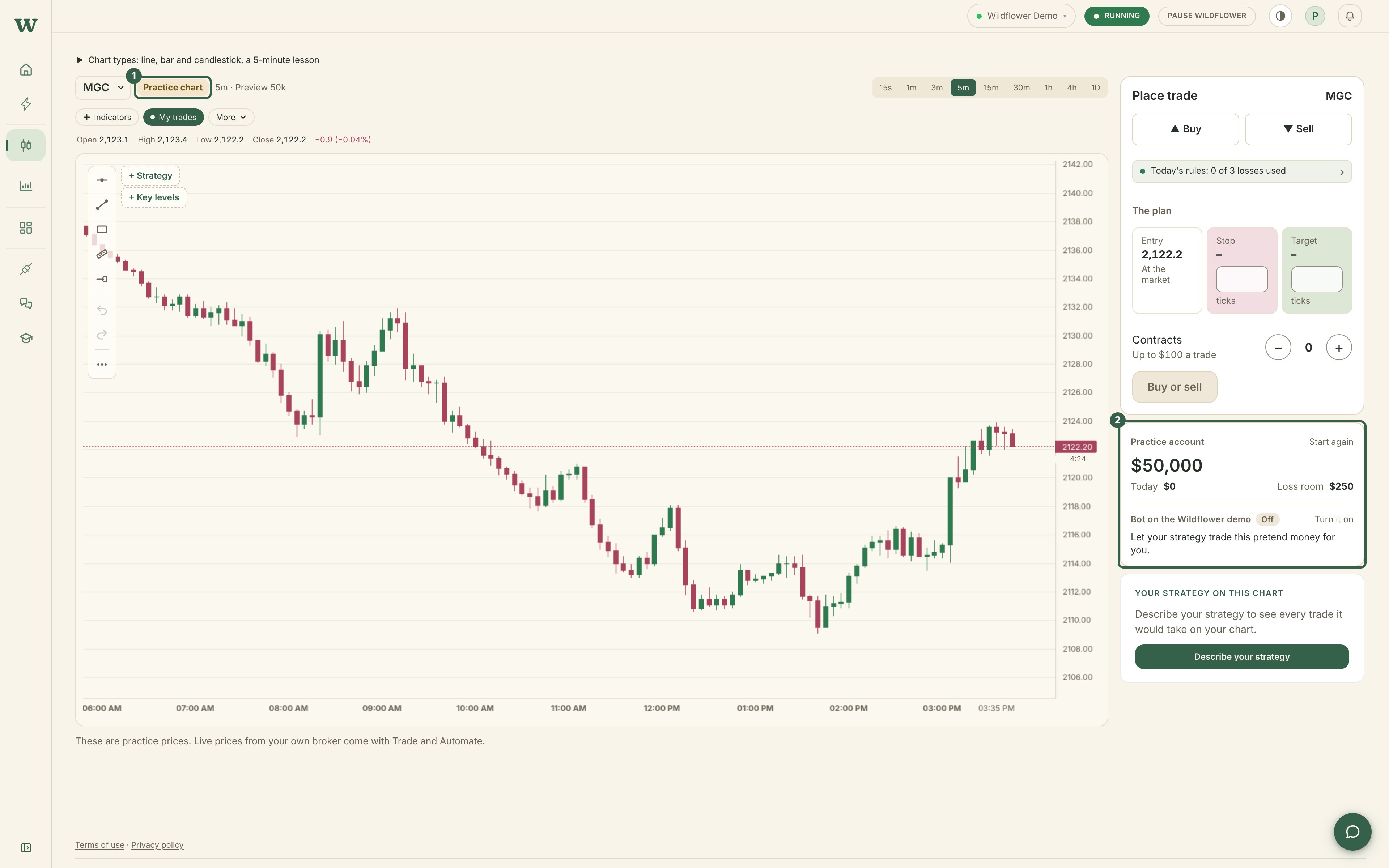
The prices are made up. They keep moving, but they aren't a real market's prices, so practice teaches the buttons, not what a market does. For live prices, connect your broker.
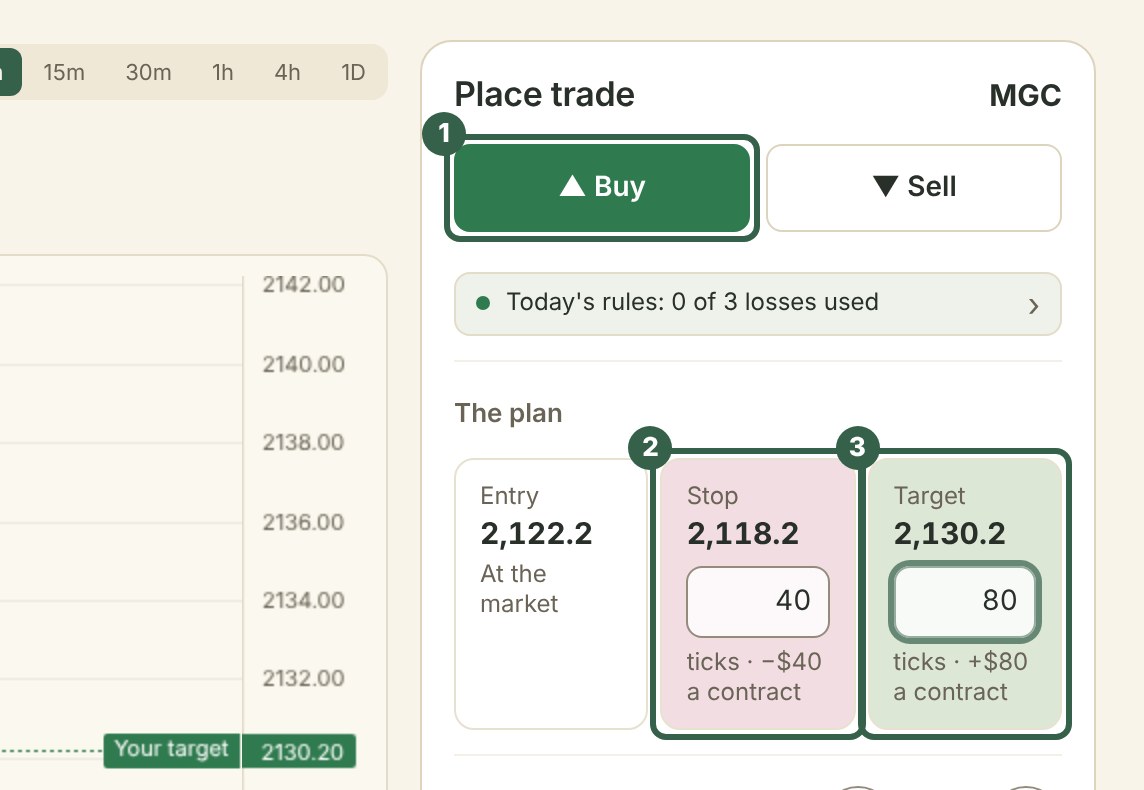
- Open Charts and pick a market.
- Press Buy or Sell in Place trade.
- Type your stop and target in The smallest step a price can move. On many stock index futures that’s 0.25 of a point.More in the glossary. Both are needed.
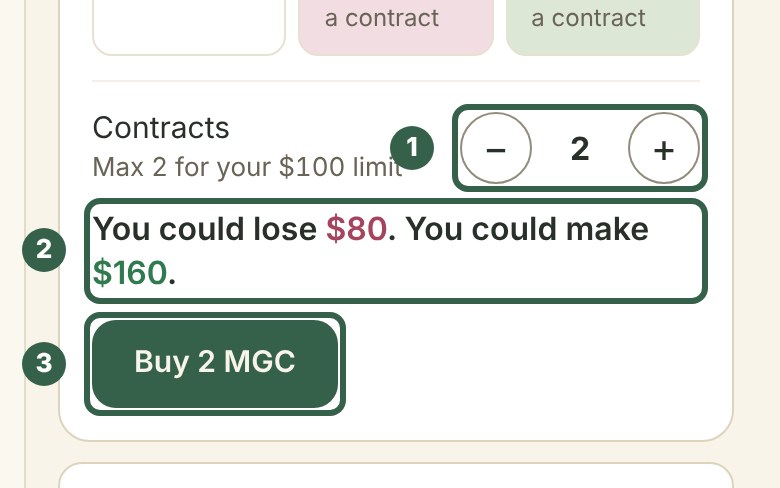
- Press + for each contract. The Practice account allows up to $100 a trade.
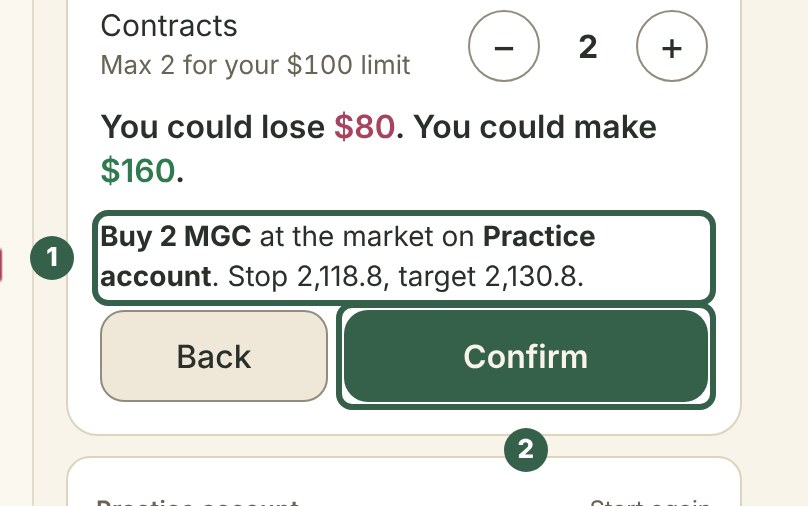
- Read "You could lose… You could make…", press Buy (or Sell), read the summary and press Confirm.
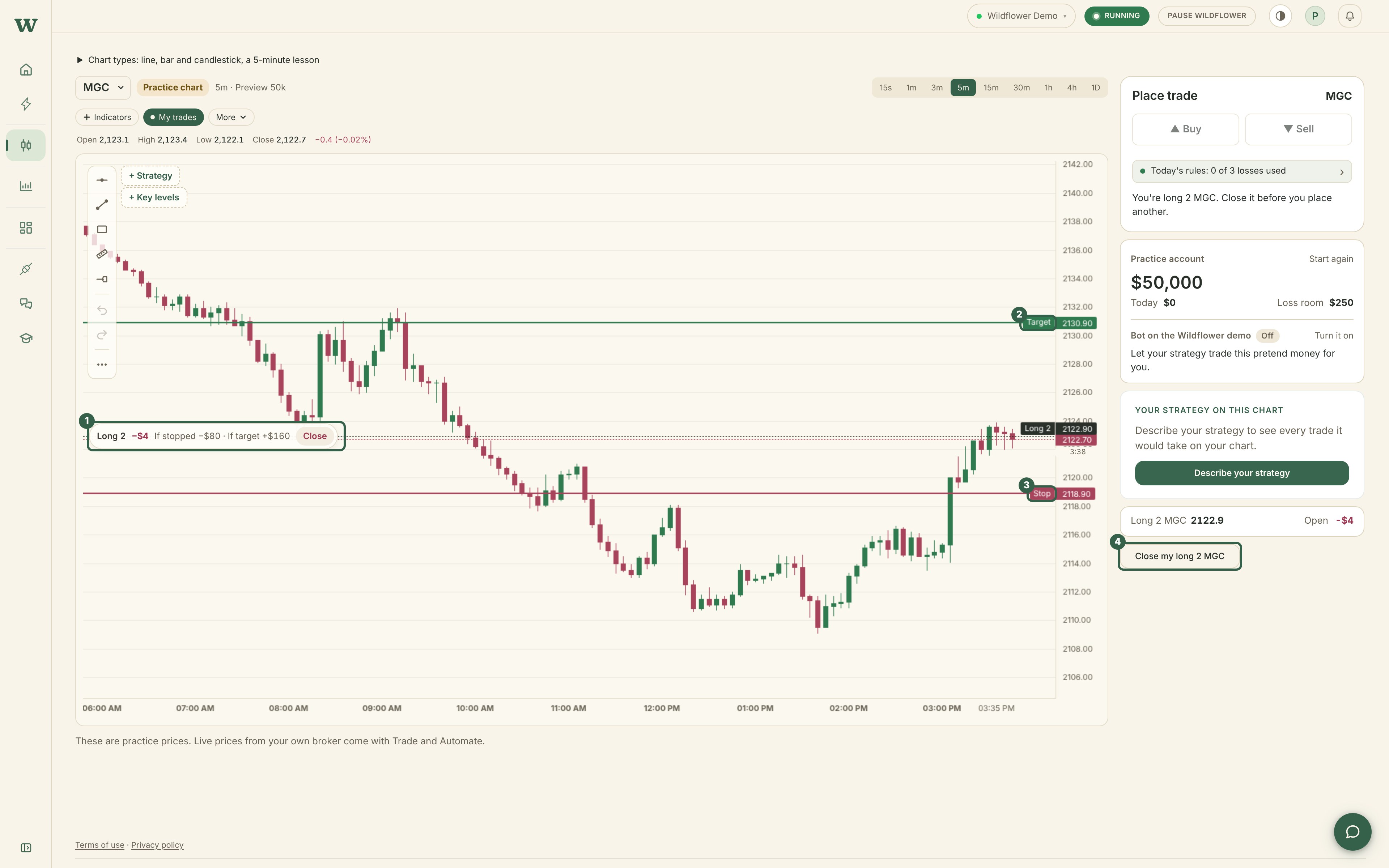
- How it fills. A trade fills at the next practice price after you confirm. A An order that closes a trade if price reaches a level you set against it. It aims to limit the loss, but in a fast market it can fill at a worse price.More in the glossary or An exit order that closes a trade when price reaches a level you choose in your favour.More in the glossary fills when price trades through it. If one candle reaches both, the stop counts.
- Fees. Each contract costs the same fee Backtest uses on the practice chart. Results show after fees.
- One trade at a time. Buy and Sell wait until it closes.
- Move it. Drag the stop or the target on the chart. A stop can only move closer, never wider than you first set it. A target can only move further away.
- Leave and come back. An open trade is kept on this device. When you return, Wildflower checks the practice prices since you left, up to 2 days, against your stop and target.
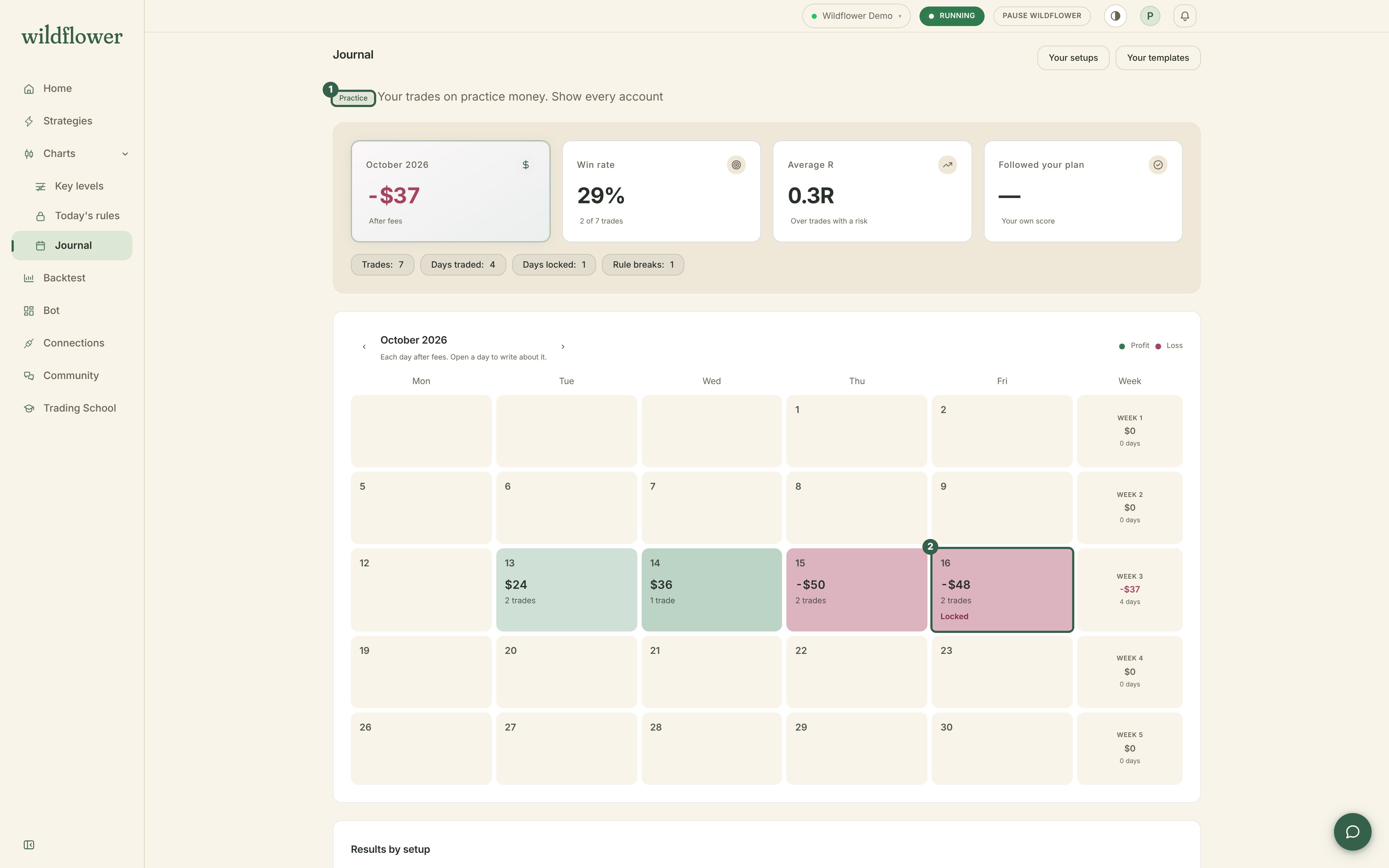
Your balance. The Practice account card shows your balance and Today: $50,000 plus your closed trades, after fees. Start again puts it back to $50,000, and your old trades stay as history. Today's rules work on practice money too.
How traders use practice. We can't tell you which to choose. These are the common choices. Some practise until the clicks are automatic, a set number of trades in a row with no slips. Some rehearse a written plan on practice for a week or two first. Some try every new idea here before real money. The prices are made up, so practice shows how you trade, not whether an idea makes money.
Worked example
Made-up numbersSam's first practice trade
Sam is made up. A buy on micro gold (MGC), $1 a tick for each contract. Stop 40 ticks, target 80 ticks. The Practice account allows up to $100 a trade.
- One contract could lose 40 × $1 = $40 and could make 80 × $1 = $80.
- Two contracts could lose $80 and could make $160. That's within $100.
- Three contracts could lose $120, over $100, so the plus button stops at 2.
The panel says "You could lose $80. You could make $160." Sam reads it out loud, then presses Confirm.
Trading is risky. You can lose money. This lesson shows how Wildflower works. It isn't advice.